Building a Model
Once a configuration file is ready, the model can be built with the gitronics build command.
After the installation of Gitronics is complete, the command can be run from the terminal.
For example:
This will assemble the model defined in baseline.yaml and write an assembled.mcnp file to the output/ directory.
HTML report
Every successful build writes a self-contained, offline build_report.html and its machine-readable build_report.json manifest.
If there is any problem during the assembly (configuration wrongly defined, missing files, duplicated card IDs, etc.), Gitronics will raise an error and the build will fail. The error message will indicate the cause of the failure and the file where it occurred.
See also: Build command details.
What happens during a build
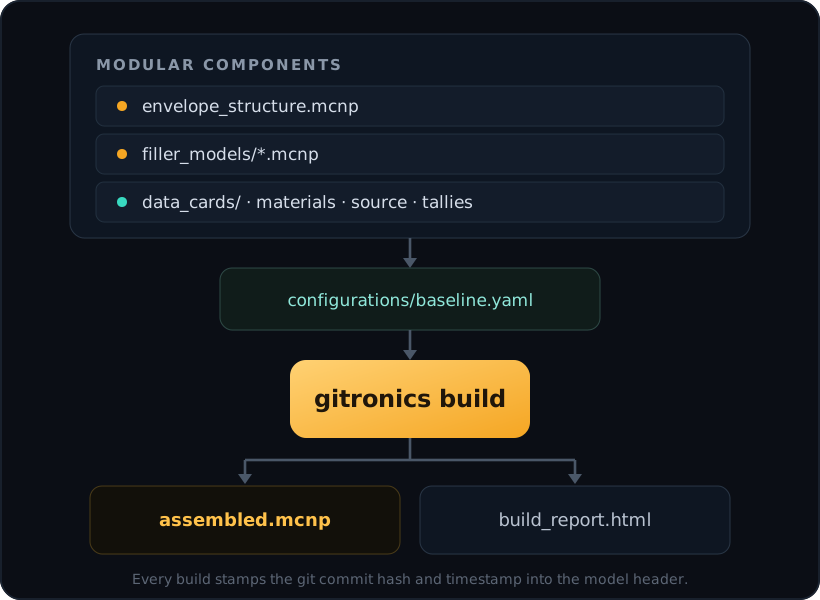
assembled.mcnp plus a build report.When running the gitronics build command, the following steps are performed:
- The configuration file (and any parent configs it inherits from) is loaded and merged.
- All the files referenced in the configuration file are read and parsed. This includes the envelope structure, filler models, and data card files.
- All fillers and data card files are reordered by their card type and ID numbers. Every
assembled.mcnpfile will have the same deterministic order of cards. Only the first ID number of the first card in each file is used to determine the order of the files. - The envelope structure is adapted to include the
FILLcards for the envelope cells that have a filler model assigned. TheFILLcards will reference the correct universe ID of the filler model by parsing the filler model in search of the firstUcard. The transformation associated to eachFILLcard is also applied as defined in the metadata of the filler model. - The envelope structure, filler models, and data card files are concatenated into a single MCNP input file.
- Assembly checks detect card ID collisions and invalid references supported by the parser. These checks do not validate geometry overlaps, transport behaviour, or physical correctness. Failure returns an error.
- The assembled model is written to the output file:
assembled.mcnp. - HTML and JSON reports are written, recording the output identity and the checks performed.
Reviewing a build
- Overview and Checks: assembly outcome, warnings, and each recorded check's result. Configuration completeness counts all marked envelopes, including those missing from the configuration. Explicit
nullassignments are complete, intentionally empty placements, not errors. - Explorer and Coverage Map: filled, explicitly empty, and unconfigured envelopes, with search and status filters. Grouping fields come from project metadata; no field such as
sectororzoneis required or privileged. Defaults favour populated fields with a small number of repeated values. - Envelope and filler details: envelope cell IDs, assignment configuration, input paths, transforms, arbitrary metadata, and searchable placement lists. IDs identify cards in the source files; source line numbers are not recorded.
- ID Map: separate lanes for cells, surfaces, materials, tallies, transformations, and universes, with exact numeric lookup, zoom, and pan. Geometry IDs identify their filler or envelope structure; data-card IDs identify their defining file and open the card definition. Materials count
Mdefinitions (notMT/MXmodifiers), tallies countFandFMESHdefinitions (not tally modifiers), and transformations countTRdefinitions, including starred forms. Universes include explicit cellUassignments and implicit root universe 0 on ordinary cells; negativeUvalues use their absolute ID, and inherited-onlyLIKE ... BUTmembership is not separately resolved. Shared IDs show all defining owners and count once in occupancy totals. Older reports without the required inventory show an unavailable state rather than claiming the namespace is empty. - Data Cards: one expandable entry per selected data file, showing its logical name, relative path, configuration role, and counts of actual card types. Expand a file to see card IDs grouped by type; open an ID (or a name such as
MODEorNPS) for its definition and references. Search matches files, IDs, and definitions, reveals matching files, and highlights matching IDs. File roles and contents are separate: a file selected undermaterialscan also contain transforms. The tab badge and overview count selected data files, not individual cards. Material definitions include direct cell references; transform definitions link matching envelope placements. This is not an exhaustive dependency analysis of all MCNP card types or inheritedLIKE ... BUTproperties. - Inputs: file paths relative to the selected configuration, byte counts, SHA-256 identities, raw configuration inheritance layers, resolved configuration, and the configuration responsible for each envelope assignment.
- Diff: baseline and current identity, assignment and transform values, component statistics, input content hashes, data-card definitions, and placement impact. Schema-1 reports remain viewable, but cannot provide content comparisons without hashes.
The content fingerprint identifies the selected input bytes, logical paths, resolved configuration, and Gitronics version. It excludes timestamps and Git working-tree status; it is not a physics-equivalence hash. The separate output checksum includes the timestamped MCNP banner and identifies the exact assembled file. Input hashes describe the bytes read by the loaders, including configuration inheritance layers, rather than a separate pre-build read. Those identities are checked again before writing; changing loaded inputs during a build requires rebuilding.
Once assembly data is available, merge, data-card parsing, reference-validation, input-stability, and output-writing failures attempt to produce a report marked failed, without an output identity. If writing that report also fails, the original build error is preserved and the reporting error is logged as a warning. A report-writing failure after otherwise successful assembly still causes the command to fail. Earlier failures such as invalid configuration or missing files still return CLI errors before a new report can be produced. An old or partially written output deck can remain in a reused output directory after failure; do not treat it as the output of the failed attempt.
Reports embed file paths, metadata, configuration, and data-card text. Review that information before sharing reports outside the project.
Logging
While the build is running, Gitronics will print INFO and WARNING messages to the terminal indicating the progress of the assembly.
Example of build logging
[2026-06-23 14:38:02 INFO gitronics] Starting model build process for: configurations/valid_configuration.yaml
[2026-06-23 14:38:02 INFO gitronics] Loading: reference_model/envelope_structure.mcnp
[2026-06-23 14:38:02 INFO gitronics] Loading: reference_model/filler_models/filler_model_1.mcnp
[2026-06-23 14:38:02 INFO gitronics] Loading: reference_model/filler_models/filler_model_2.mcnp
[2026-06-23 14:38:02 INFO gitronics] Loading: reference_model/data_cards/my_transform.transform
[2026-06-23 14:38:02 INFO gitronics] Loading: reference_model/data_cards/materials.mat
[2026-06-23 14:38:02 INFO gitronics] Loading: reference_model/data_cards/fine_mesh.tally
[2026-06-23 14:38:02 INFO gitronics] Loading: reference_model/data_cards/volumetric_source.source
[2026-06-23 14:38:02 INFO gitronics] Adapting envelope structure with FILL cards
[2026-06-23 14:38:02 INFO gitronics] Composing model
[2026-06-23 14:38:02 INFO gitronics] Performing validation checks on the assembled model
[2026-06-23 14:38:02 INFO gitronics] Build completed successfully in: output/assembled.mcnp
WARNING messages
Watch out for WARNING messages, they indicate potential mistakes that will not stop the build, for example, the existence of envelope cells in the envelope structure file that are not referenced in the configuration.
If the intention was to leave them empty, it is better to explicitly declare them as null in the configuration file to make sure they are not forgotten: envelope_name: null.
Header
The assembled.mcnp file will contain a header comment at the top of the file like:
C ============================================================
C  Built by gitronics v0.1.0
C  Configuration : configurations/baseline.yaml
C  Git commit    : v0.5.18-3-g04d555a
C  Date / time   : 2026-06-23 12:34:51
C ============================================================
The first information line shows the Gitronics version used to build the model. The second line shows the configuration file used to build the model, relative to the current working directory. The third line shows the Git commit hash of the Gitronics project repository at the time of the build. The fourth line shows the date and time when the build was performed.